
As cloud environments expand and organizations grow, the difficulty of managing infrastructure rises exponentially. Especially after a person in charge leaves the company or a project ends, test servers or databases that no one uses are often left neglected due to omissions during the handover process. We call these 'Zombie Resources'.
These orphaned instances generate massive cloud costs every month without creating any business value. To prevent this cost leakage, OpsNow provides a smart detection solution that automatically finds unused resources and recommends actions to take.
In a multi-cloud environment where hundreds or thousands of instances are running, checking which resources are actually in use and which are neglected one by one is nearly impossible. OpsNow's automatic detection feature continuously analyzes system resource usage (CPU, Network, etc.) and access history to accurately identify inactive 'zombie resources' and recommends immediate deletion or suspension to administrators.
No matter how good a commitment discount (SP/RI) you apply, there is no greater waste than leaving unused resources turned on. The OpsNow solution scans the entire cloud environment to automatically find inactive instances, unattached volumes, and unused IPs. Administrators can check the exact amount of wasted costs through an intuitive UI and achieve immediate cost savings by instantly deleting unnecessary resources according to the system's recommendations.
Based on the detected data, the system does not simply recommend 'deletion' but provides optimal cost-saving action items suited to the condition.
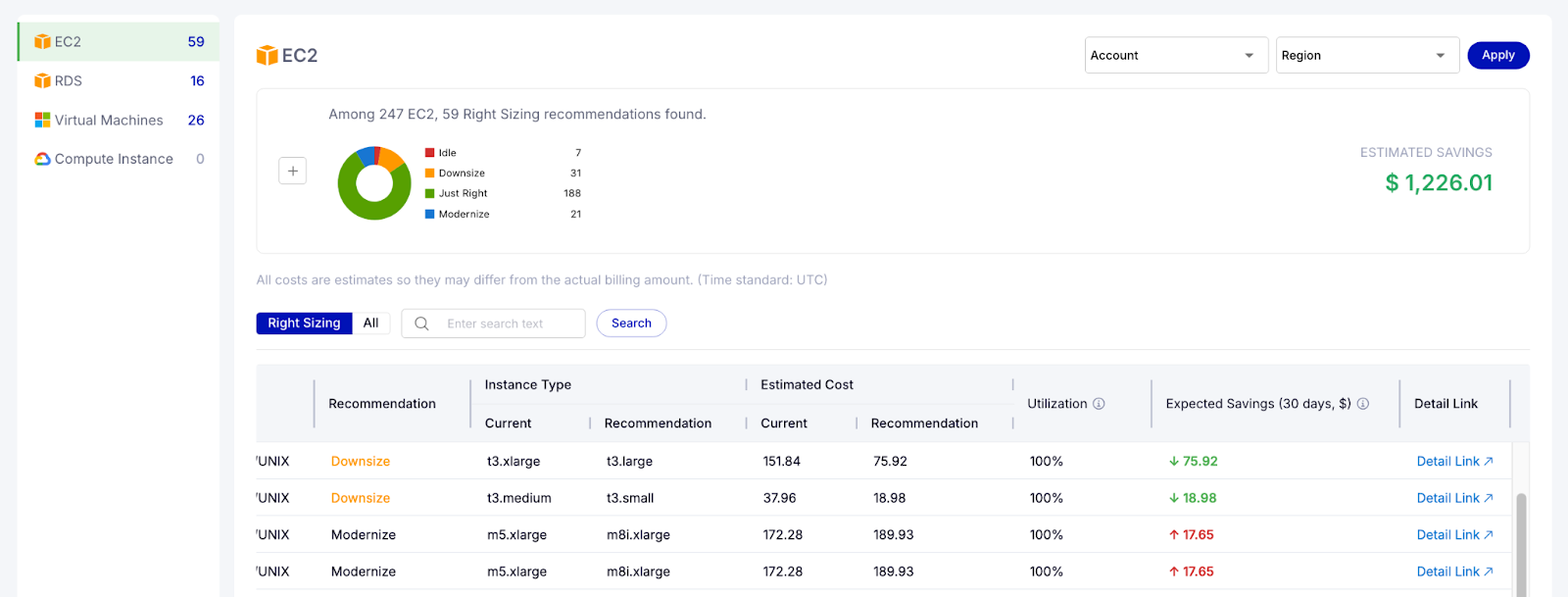
Without the need to analyze complex data, you can check the list of zombie resources and expected cost leaks at a glance through an intuitive UI on the dashboard. Review the recommendations suggested by the system and clean up resources with just a few clicks. Now you can completely fill the holes of hidden cloud costs.
As cloud environments expand and organizations grow, the difficulty of managing infrastructure rises exponentially. Especially after a person in charge leaves the company or a project ends, test servers or databases that no one uses are often left neglected due to omissions during the handover process. We call these 'Zombie Resources'.
These orphaned instances generate massive cloud costs every month without creating any business value. To prevent this cost leakage, OpsNow provides a smart detection solution that automatically finds unused resources and recommends actions to take.
In a multi-cloud environment where hundreds or thousands of instances are running, checking which resources are actually in use and which are neglected one by one is nearly impossible. OpsNow's automatic detection feature continuously analyzes system resource usage (CPU, Network, etc.) and access history to accurately identify inactive 'zombie resources' and recommends immediate deletion or suspension to administrators.
No matter how good a commitment discount (SP/RI) you apply, there is no greater waste than leaving unused resources turned on. The OpsNow solution scans the entire cloud environment to automatically find inactive instances, unattached volumes, and unused IPs. Administrators can check the exact amount of wasted costs through an intuitive UI and achieve immediate cost savings by instantly deleting unnecessary resources according to the system's recommendations.
Based on the detected data, the system does not simply recommend 'deletion' but provides optimal cost-saving action items suited to the condition.
Without the need to analyze complex data, you can check the list of zombie resources and expected cost leaks at a glance through an intuitive UI on the dashboard. Review the recommendations suggested by the system and clean up resources with just a few clicks. Now you can completely fill the holes of hidden cloud costs.
As cloud environments expand and organizations grow, the difficulty of managing infrastructure rises exponentially. Especially after a person in charge leaves the company or a project ends, test servers or databases that no one uses are often left neglected due to omissions during the handover process. We call these 'Zombie Resources'.
These orphaned instances generate massive cloud costs every month without creating any business value. To prevent this cost leakage, OpsNow provides a smart detection solution that automatically finds unused resources and recommends actions to take.
In a multi-cloud environment where hundreds or thousands of instances are running, checking which resources are actually in use and which are neglected one by one is nearly impossible. OpsNow's automatic detection feature continuously analyzes system resource usage (CPU, Network, etc.) and access history to accurately identify inactive 'zombie resources' and recommends immediate deletion or suspension to administrators.
No matter how good a commitment discount (SP/RI) you apply, there is no greater waste than leaving unused resources turned on. The OpsNow solution scans the entire cloud environment to automatically find inactive instances, unattached volumes, and unused IPs. Administrators can check the exact amount of wasted costs through an intuitive UI and achieve immediate cost savings by instantly deleting unnecessary resources according to the system's recommendations.
Based on the detected data, the system does not simply recommend 'deletion' but provides optimal cost-saving action items suited to the condition.
Without the need to analyze complex data, you can check the list of zombie resources and expected cost leaks at a glance through an intuitive UI on the dashboard. Review the recommendations suggested by the system and clean up resources with just a few clicks. Now you can completely fill the holes of hidden cloud costs.